FILTER



Celemony - Melodyne 5 Studio UG Assistant (licence)


Celemony Melodyne 5 Studio, upgrade from Melodyne Assistant. Melodyne 5 Studio represents a colossal leap forward for users of Melodyne Assistant. You now have access to complete polyphonic editing via the "DNA Direct Note Access" algorithm and to the "Universal" algorithm for entire tracks. The new 'Melodic' algorithm handles sibilants separately for perfect vocals. The Chord Track and Fade Tool/Leveling Macro offer unprecedented musical and dynamic control. It's the transformation of an assistant into a state-of-the-art audio workstation for the most demanding productions. Licence available for download.
Presentation
Why is Melodyne 5 studio an absolutely fundamental upgrade for Melodyne Assistant users?
1. The biggest leap : DNA Direct Note Access and polyphonic editing
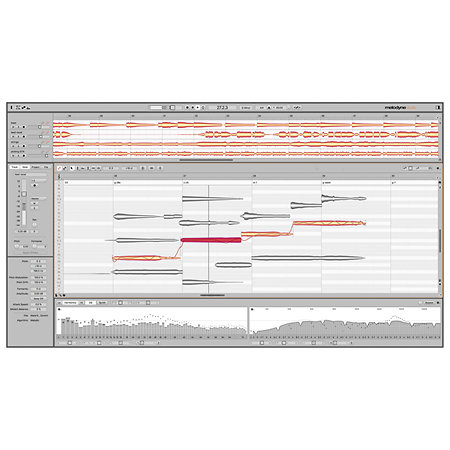
- Access to notes in chords: This is the most fundamental and revolutionary difference from Assistant. Melodyne Assistant does not offer polyphonic editing. Melodyne 5 studio includes the patented "DNA Direct Note Access" (DNA) technology. This means that Melodyne can analyse polyphonic recordings (such as a piano, acoustic guitar or ensemble) and identify the individual notes that make up the chords. You can then edit each note of the chord independently - changing its pitch, volume, attack, duration - as if it were monophonic. It's an absolutely transformative capability for musical correction and creation.
- Polyphonic Sustain algorithm: This is the specific algorithm that makes DNA editing possible, and it's at the heart of Studio 5's superiority over Assistant.
2. Full track management: The "Universal" algorithm
- Melodyne Assistant can only analyse basic monophonic or percussive tracks. Melodyne 5 studio includes the "Universal" algorithm. This algorithm is designed to analyze and edit complex tracks such as entire mixes, drum busses, or dense instrumental recordings where individual notes are not clearly defined or separated. It lets you adjust the overall tempo, pitch and even quantize these complex tracks. It's a powerful tool for mastering or adapting complex audio loops.
3. Vocal revolution: Improved 'Melodic' algorithm and sibilant detection
- Unrivalled vocal quality: The 'Melodic' algorithm for vocals and melodic instruments is far more advanced in Melodyne 5 studio than it is in Assistant. It offers more transparent and musical pitch and time corrections, making your voices sound more natural and polished.
- Fine Voice Control (Sibilantes): This is a key feature completely absent from Melodyne Assistant. Melodyne 5 studio detects and manages sibilants (the "s", "ch", "f" sounds, etc.) and breath sounds separately. You can adjust their volume independently of the vocal, eliminating aggressive 's's without compressing the voice or altering its timbre - a huge advantage for professional vocal mixing.
4. Integrated harmony and composition: The Chord Track
- This feature is completely new to Assistant users. Melodyne 5 studio incorporates a 'Chord Track' that automatically recognizes the chords in your song (even from audio) or allows you to define them.
- Easy harmonization: You can then automatically or manually adapt the edited notes to this harmonic structure. It's an invaluable tool for correcting harmonic errors, exploring reharmonisations or simply ensuring that all the musical parts fit together perfectly, a level of musical control that doesn't exist in Assistant.
5. Dynamic control and musicality: The Fade Tool and Leveling Macro
- Precise dynamic management: The "Fade Tool" lets you create input/output fades on individual notes. This gives you granular control over the attack and release of each sound, even in complex contexts.
- Vocal homogenisation: The 'Leveling Macro' is a macro that compensates for variations in volume between notes, making vocal performances more homogenous without the excessive compression often required for this result. These tools are essential for fine mixing and natural vocals.
6. New "Percussive Pitched" algorithm
- Although Assistant handles basic percussion, Studio 5 adds the "Percussive Pitched" algorithm for precise pitch control of tuned percussive instruments.
In summary, for Melodyne Assistant users, upgrading to Melodyne 5 Studio is not just an upgrade, it's a leap towards professional production capabilities. You'll go from a basic monophonic editing tool to a complete suite capable of :
- Edit individual notes in polyphonic chords (DNA).
- Manipulate entire tracks (Universal).
- Perfecting voices with advanced sibilant management.
- Work harmonically with the Chord Track.
- Control dynamics note by note.
It's a major investment that will increase your editing capabilities tenfold and open up creative and corrective horizons impossible with Melodyne Assistant.
Features
Other features
-
Celemony Melodyne 5 Studio Upgrade from Assistant
-
Download license (you will receive your activation code by e-mail with the invoice)
-
Version reserved for users who already have a Melodyne Assistant activated on their Celemony account
-
Pitch correction and synchronisation software and plug-in
-
Free editing of frequencies and time of mono and polyphonic audio files in exceptional quality
-
DNA (Direct Note Access) technology for editing individual notes within chords played with instruments or ensembles
-
Improved intonation and timing, phrasing and dynamics, while retaining the naturalness and liveliness of the source material
-
Creation of duplicates and harmony voices
-
Different algorithms for different sources: melodic with sibilant detection, percussive and universal
-
Edit tempo, pitch, vibrato, pitch drift, formants, volume, timing, beat handles, attack speed and note separation
-
Multitrack editing with variable display and editing options
-
Sound editor lets you intervene in the structure of harmonics
-
Selectable reference track quantization
-
Macros on all tracks for pitch and timing correction and levelling
-
Comprehensive functions for working with scales and tunings
-
Chord track and grid and automatic chord recognition
-
Tempo detection and editing
-
Quantization and scale correction
-
Inspectors for quick access to all parameters
-
Audio-to-MIDI polyphonic function and export of MIDI files
-
Supported formats (64-bit only) : Standalone / VST3 / AU 64-bit / AAX Native 64-bit / ARA2
-
Copy protection: Online activation, iLok 2 / iLok 3
-
Simultaneous activation: up to 2 workstations
-
System requirements: Win10 (64-bit) or higher, Mac OSX 10.12 (64-bit) or higher, Dual Core processor, 4 GB RAM, Internet connection
You may also like


Spotlight on

Celemony is
the brand at the origin of the famous audio retouch software Melodyne. Your
singer is a little tired and does not sing that well today? No problems with
Melodyne you can rectify the tone, rhythm, notes…