
FILTER
FILTER

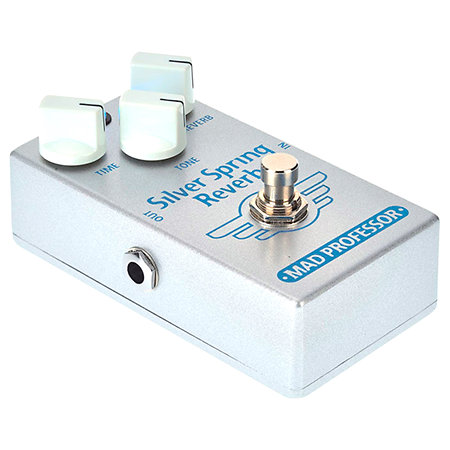
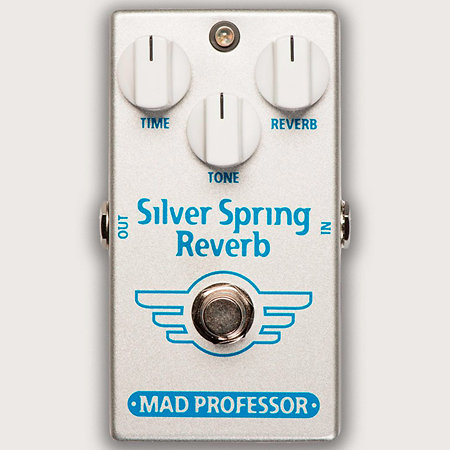
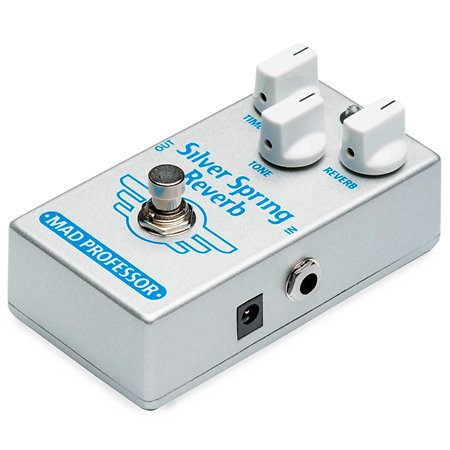


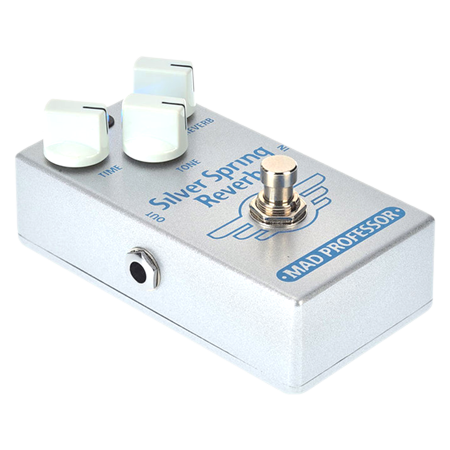
Mad Professor - Silver Spring Reverb
165,83 €
excl VAT
including eco-part : 0,90 €
In Stock
Usually ships within 3 days
+infos
Guarantee 3
years

Fred

Eric
Do you need help?
Although reverbs tend to be effects for clean sounds, the Silver Spring Reverb also works very well on saturated sounds, whether it's placed before or after a saturation pedal. Analogue/digital reverb pedal, the original signal remains entirely analogue and is not filtered, only the effect is digital, so as not to distort the sound of your instrument.
ARTICLE N° 83638
Mad Professor - Silver Spring Reverb
Mad Professor - Silver Spring Reverb
165,83 €
excl VAT
including eco-part : 0,90 €
In Stock
Usually ships within 3 days
+infos
Guarantee 3
years
Fred
Eric
Do you need help?
Presentation
The bandwidth of the Silver Spring is somewhere between the dark warmth of an amp spring reverb and the crystal clarity of a studio reverb.
It has no noise reduction system, to keep the reverb's extinction as natural as possible.
The Tone control lets you modify the bandwidth of the effect to give an increasingly brilliant sound.
Turn it all the way to the left and you'll get an effect akin to a spring reverb; turn it all the way to the right and you'll get more of a studio reverb.
It has no noise reduction system, to keep the reverb's extinction as natural as possible.
The Tone control lets you modify the bandwidth of the effect to give an increasingly brilliant sound.
Turn it all the way to the left and you'll get an effect akin to a spring reverb; turn it all the way to the right and you'll get more of a studio reverb.
Other features
-
Mad Professor Silver Spring
-
Effect for electric guitar
-
Type : Reverb
-
Controls: Time, tone, reverb
-
Mode : True Bypass
-
Input / Output : 2 x 6.35 mm jacks
-
Power supply: 9 V battery or 9 V DC adapter (sold separately)
-
Dimensions: 111 x 69 x 50 mm
-
Weight : 250 g
To find out more...
Silver Spring controls :
-TIME: Sets the reverb decay time. Turn clockwise for longer decay.
In the fully anti-clockwise position, the decay is that of a small room.
Fully clockwise, the decay resembles the large room sound of a plate reverb.
Around the centre setting, the average decay time is optimal for rhythmic chords and single notes.
- TONE: Adjusts the bandwidth of the reverb signal. Turning clockwise gives a brighter reverb tone and counter-clockwise a darker tone.
Fully counter-clockwise approximates the response of a typical spring reverb, clockwise a studio reverb.
- REVERB: This adds reverb to the dry signal. The reverb can be completely disabled if the reverb knob is turned fully counter-clockwise and fully clockwise.
-TIME: Sets the reverb decay time. Turn clockwise for longer decay.
In the fully anti-clockwise position, the decay is that of a small room.
Fully clockwise, the decay resembles the large room sound of a plate reverb.
Around the centre setting, the average decay time is optimal for rhythmic chords and single notes.
- TONE: Adjusts the bandwidth of the reverb signal. Turning clockwise gives a brighter reverb tone and counter-clockwise a darker tone.
Fully counter-clockwise approximates the response of a typical spring reverb, clockwise a studio reverb.
- REVERB: This adds reverb to the dry signal. The reverb can be completely disabled if the reverb knob is turned fully counter-clockwise and fully clockwise.
Videos
You may also like




Spotlight on

Equivalent products
Tops of the brand
Mad Professor - Silver Spring Reverb
165,83 € excl VAT